Registration links and access
Share the registration page
- Edit a saved webinar.
- In Registration link, use Open registration page to inspect it or Copy registration link to copy its address.
- Share that registration link through your normal invitation channel.
The public calendar lists discoverable events. Private event hides an event from that calendar, but anyone with its direct link can register unless another restriction applies. A participant's personal waiting-room link is different from the general registration link; do not distribute one participant's personal link to a group.
Link parameters
Append parameters to the saved registration link to prefill answers or track campaigns. Start with ? and separate entries with &. For example:
Use Copy example link for a complete example that includes the event address. The participant still reviews and submits the form; prefilled values are editable.
- Names are case-sensitive. Use field IDs shown in Supported parameters and form fields, not question labels.
- Text fields accept text; ratings accept a number from 1 to the configured maximum. For checkboxes, use exact option labels and repeat the field parameter for multiple answers, or separate values with commas.
sourcerecords a campaign label up to 255 characters. The oldersparameter also works; nonemptysourcetakes priority.- Advanced: combine answers with prefill accepts a URL-encoded JSON object in
prefill. Use field IDs as keys, strings for text, numbers for ratings and arrays for checkbox answers. Copy prefill example link builds an encoded example for the current event. - Non-null values in
prefilloverride individual field parameters. Campaign precedence is the first nonempty value amongprefill.source,sourceands. Invalid JSON and unknown field IDs are ignored. - Encode a space as
%20or+, an ampersand as%26, and a literal plus as%2B.
Custom campaign/CRM parameters and repeated values are retained separately from submitted answers in the report. Credential parameters and embedded URLs are omitted; capture is limited to 16 KB, with omitted/truncated data marked. Repeat signups keep the original registration's answers and link parameters. Test links before distributing them.
Invitation List and Block List
Open Edit webinar → Access Lists.
- Type an address and press Enter or comma to add it to Invitation List or Block List.
- Use the import control for CSV files. Import reads the first column, appends to the existing list and skips exact duplicates.
- Remove individual entries or use Clear to clear the form's list.
- Select Save event changes to apply edits.
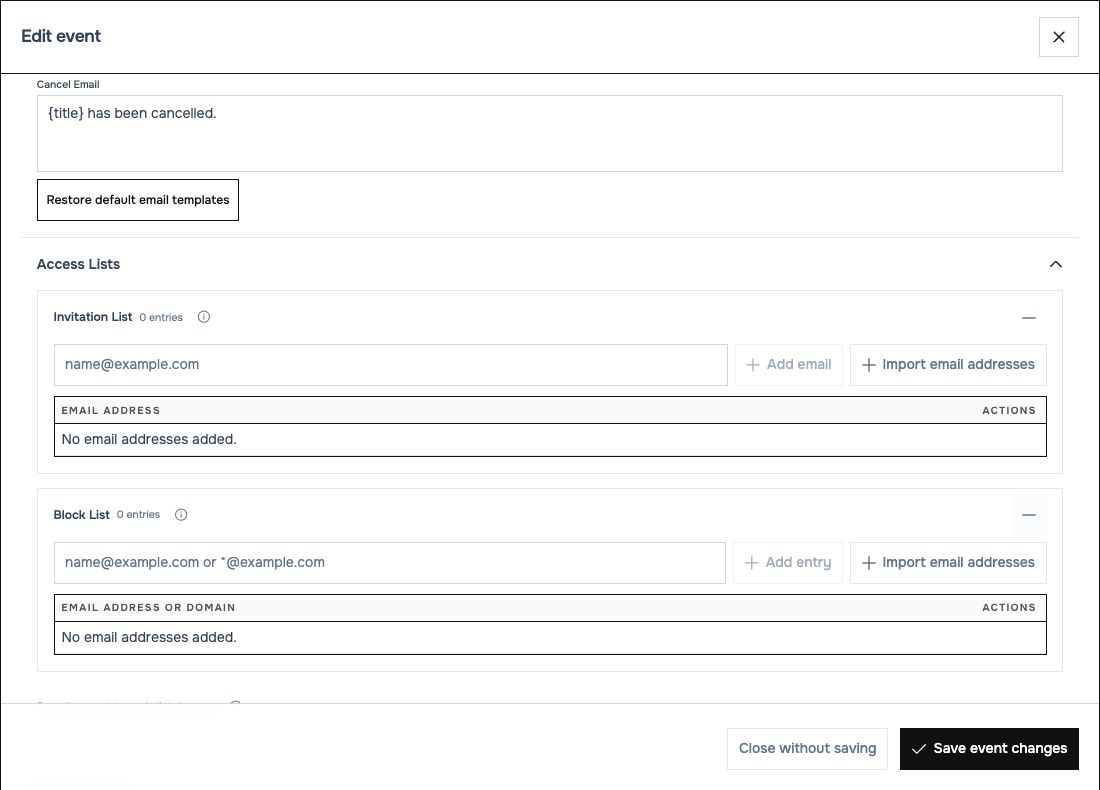 Invitation contacts and blocked addresses serve different purposes.
| Rule | Meaning |
|---|---|
| Invitation List | A saved contact list for comparison/reporting. It does not send invitations, register people or restrict who can register. Share the link yourself. |
| Block List | Prevents matching addresses at registration and entry. Matching ignores capitalization. |
*@example.com in a block list |
Blocks the exact domain. Subdomains need their own entry; other wildcard forms are unsupported. |
| Studio blocks | Also apply to event admission and cannot be overridden by the event's invitation list. |
| Studio allow list | Limits standalone studio joins; event magic links bypass that allow list. |
Blocking somebody does not delete an existing registration, sign out somebody already in the studio, or stop scheduled emails. Do not treat a block-list edit as a live participant-removal control.
What your attendees experience
- Open the registration page, review the event's schedule and complete its required fields.
- Submit registration and follow the confirmation instructions. Email delivery provides the personal event link when configured successfully.
- Open the personal link to reach the waiting room. Before the scheduled start, it shows waiting information.
- Enter when admission becomes available. Full, blocked, cancelled or ended events can prevent entry.
Organizers should inspect the preview first and use a controlled test attendee for an email-based rehearsal. The documentation example does not send invitations to real participants.
Related: Studio restrictions, email settings, troubleshooting.