Emails and delivery
Use Edit webinar → Emails and delivery to customize messages and their timing. Save the event to apply changes to future deliveries.
Set delivery timing
| Control | When it sends |
|---|---|
| Send reminder / Minutes before | Before the scheduled start |
| Send cancellation notice | When the event is cancelled |
| Attendee follow-up / Minutes after | After the event, for people who joined |
| No-show follow-up / Minutes after | After the event, for registered people who did not join |
Timing fields accept 1–10,080 minutes. New events initially enable these options with 60-minute reminder/follow-up intervals. Review them for every event. The documentation rehearsal disables scheduled messages and cancellation notices.
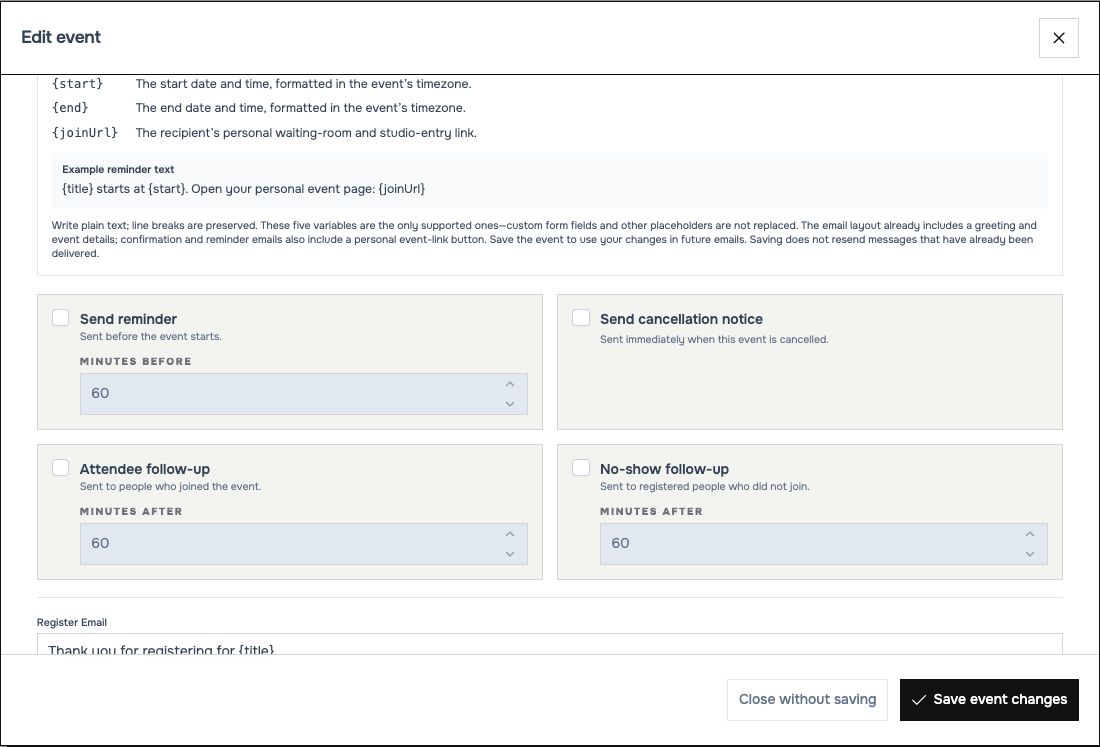 Delivery switches and message texts are saved with the webinar.
Write your messages
Edit Register Email, Reminder Email, Follow-up (Joined), Follow-up (No Show) and Cancel Email. Write plain text; line breaks are preserved. The surrounding email layout already provides a greeting and event details.
| Variable | Replaced with |
|---|---|
{title} |
Current webinar title |
{name} |
Attendee display name, or “Guest” if missing |
{start} |
Start date/time in the event's time zone |
{end} |
End date/time in the event's time zone |
{joinUrl} |
Recipient's personal waiting-room and entry link |
Example reminder:
Keep variable spelling and braces unchanged. Custom registration fields and other placeholders are not substituted. Confirmation and reminder emails also include a personal event-link button.
Restore default email templates replaces the editable texts with the defaults; save the event to apply them. Saving edited text does not resend already-delivered messages.
Check delivery expectations
The invitation list itself never sends invitations. Delivery also depends on the installation's email service and background processing. The documentation run does not verify mailbox delivery; arrange a controlled mailbox test before relying on reminders or follow-ups for a real webinar.
Related: Access and registration links, email troubleshooting.